Now on the App Store · behaviour intelligence for digital wellbeing

Understand your digital life. And your family's.

See your digital life clearly, what it's giving you, what it's costing you, and your kids' too.

Download on the App Store

Free to download. No account needed. Your screen time, health data and scores never leave your phone.

Why we're building this

We're living through one of the largest behavioural shifts in human history, and flying blind through it.

Social media is engineered for engagement. AI is accelerating dependency. Yet we have almost no useful way to understand what our digital behaviour is telling us about our attention, relationships and wellbeing, or whether any of it is making our lives better or worse.

~⅓

of your waking life is now spent on a screen. You rarely know what that time was actually made of.

DataReportal / Statista, 2024
38%

of adults sleep worse because of bedtime screen use, rising to 46% in under-25s. None of us are immune.

Amer. Academy of Sleep Medicine, 2026
13%

higher risk of depression in adolescents for each extra hour spent on social media each day.

Dose-response meta-analysis, 2022

Digital behaviour is a powerful, largely untapped signal of human wellbeing. Your devices already capture the patterns. ThirdLife turns them into insight that helps you, and your family, live better.

What you'll seeAvailable now

Six ways to see your digital life clearly, and act on it.

Not a screen-time counter, but a read on what that time is actually doing for you.

Overview

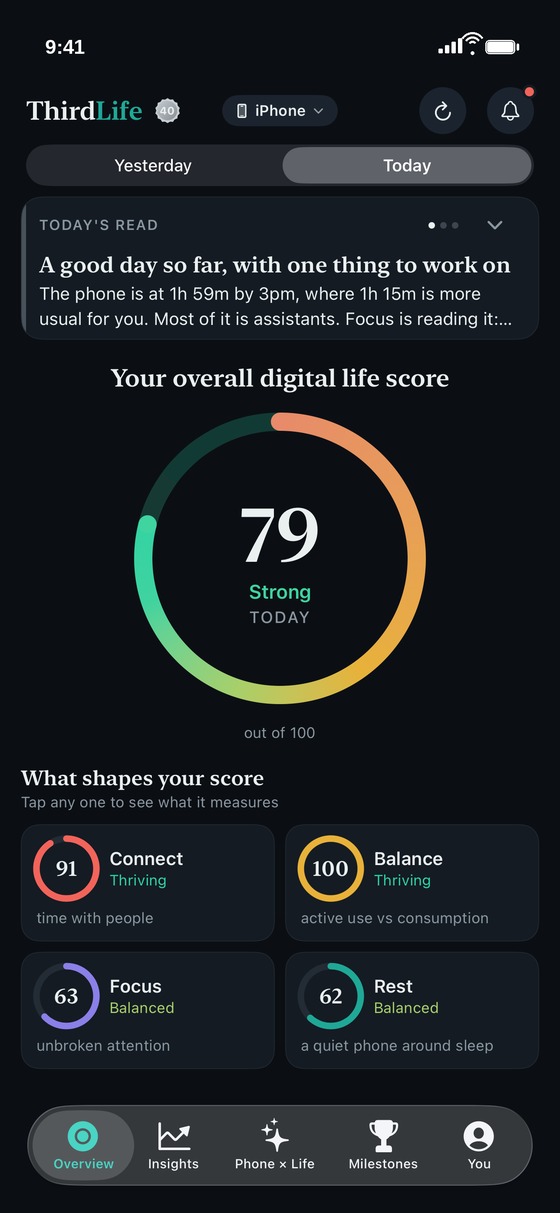
Your whole day distilled into one honest score, with the four rings beneath it, Connect, Balance, Focus and Rest. Tap any ring to see exactly what it measures. Not how long you were on your phone, but what that time was actually doing for you.

See it below ↓

Insights

The why behind every score. Today's read and the month's in plain language, plus trends for every ring that you can page back through, week by week, as far as Screen Time keeps. Findings graded by how much they matter, with named apps and real minutes.

See it below ↓

Phone × Life

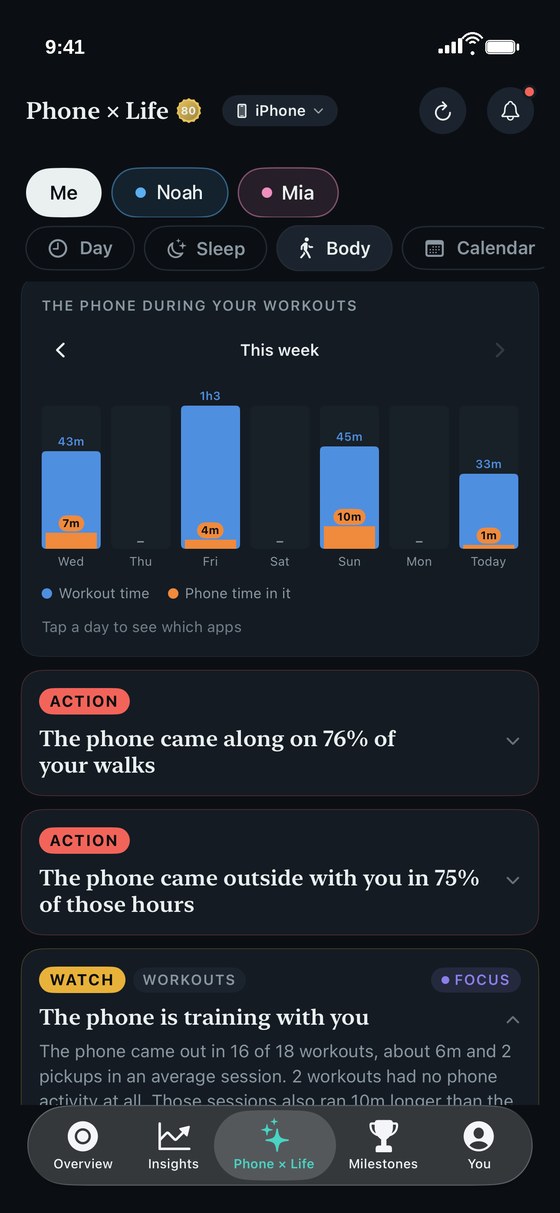
Everything else looks at your phone on its own. This looks at your phone next to the rest of your life: your sleep, your body and your calendar. On the nights you were on your phone late, did you sleep less? How much of each workout was the phone actually in? On your busiest days, did your attention hold? Connect Apple Health and your calendar and the comparisons begin.

See it below ↓

Family

The same app on your child's phone, with the full picture rather than a watered-down version. You set the limits, the sleep window and school hours, locked with your passcode. Then you look at it together.

See it below ↓

Milestones

Change is hard to see day to day, so ThirdLife marks it. Your practice, your recent form, your streaks and how this week is going, noted in small, honest milestones. Encouragement and badges when things go well, never a game you have to win.

Limits

Seeing is half of it. Limit a single app or a whole category like social media, with daily totals and before-sleep limits that either stop you at the line or send a gentle nudge, as hard or as soft as you want them. ThirdLife also suggests limits for the apps that are constantly heavy.

ThirdLife overview screen showing the four rings and overall daily score
At a glanceAvailable now

Four rings and an overall score. One honest picture of your day.

Connect, Balance, Focus and Rest, each scored out of 100 and rolled into a single daily score, with a plain-language read on what led the day. The scale is named in the app: Thriving, Strong, Balanced, Finding balance, Needs care. The scoring is designed rather than guessed, and we are working with researchers to test how well it holds.
InsightsAvailable now

Then go deeper, one ring at a time.

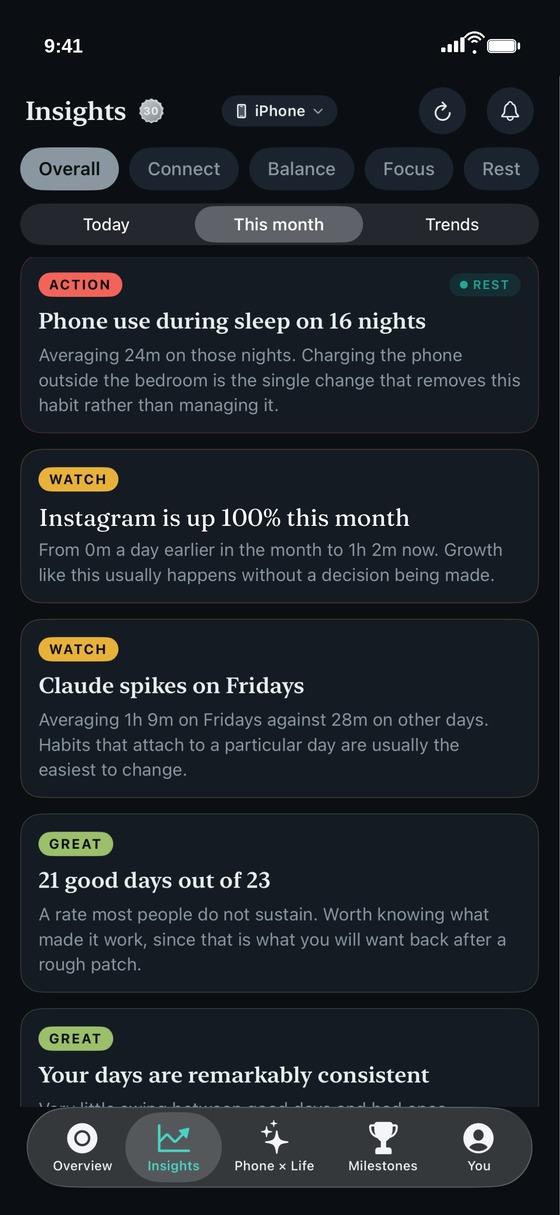
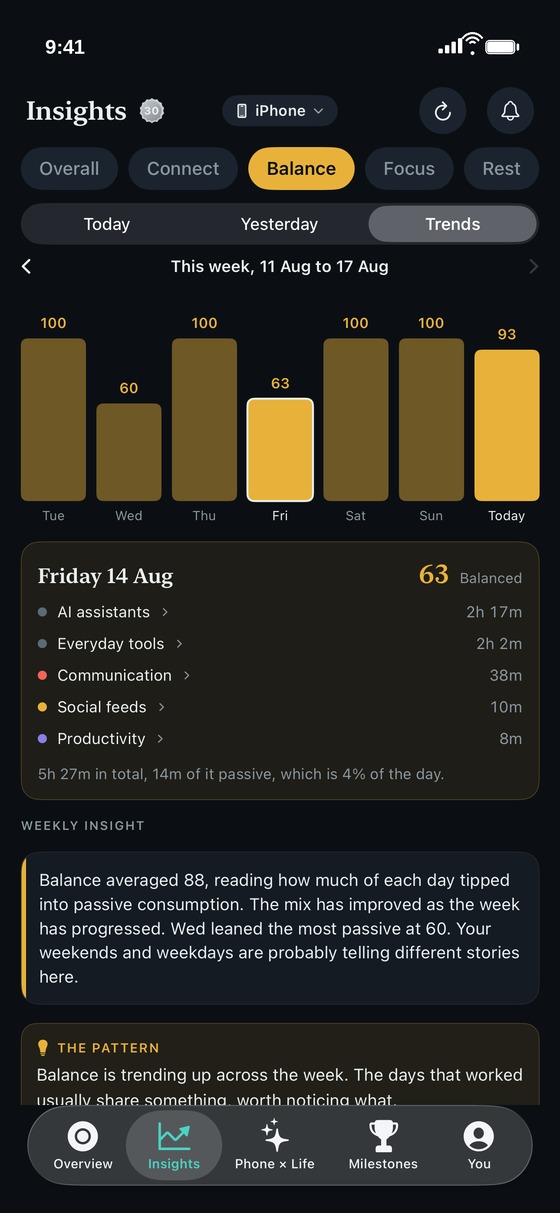
Insights holds the reads and the charts together. Today's read and the month's in plain language, beside the trends that explain them, for the overall score and for every ring. Specific, not vague: named apps, real minutes, actual days.

  • Overall and each of the four rings, broken down
  • Today's reads and the month's, beside the charts they explain
  • Trends you can page back through, week by week, as far as your data goes
ThirdLife Insights showing this month's reads, graded Action, Watch and Great
The reads: what stood out this month, graded and named.
ThirdLife Insights showing the Balance ring on Trends, with the week pager and a daily breakdown
The charts: page back week by week, ring by ring.
ThirdLife Phone x Life Body view, workout time each day this week with the phone time inside it in orange, and findings on walks, time outside and workouts
Phone × LifeAvailable now

Your phone, next to the rest of your life.

Every screen time app can tell you how long you were on your phone. None of them can tell you what it cost. ThirdLife reads your phone beside your actual sleep, your workouts and steps, and the time you commit in your calendar, and finds what moves together.

  • How your sleep changes on the nights your phone stays up late
  • How much of each workout the phone was actually in
  • Whether a heavy day of meetings costs you the evening after it

See how it works →

And if you're a parentAvailable now

Your children, on your phone.

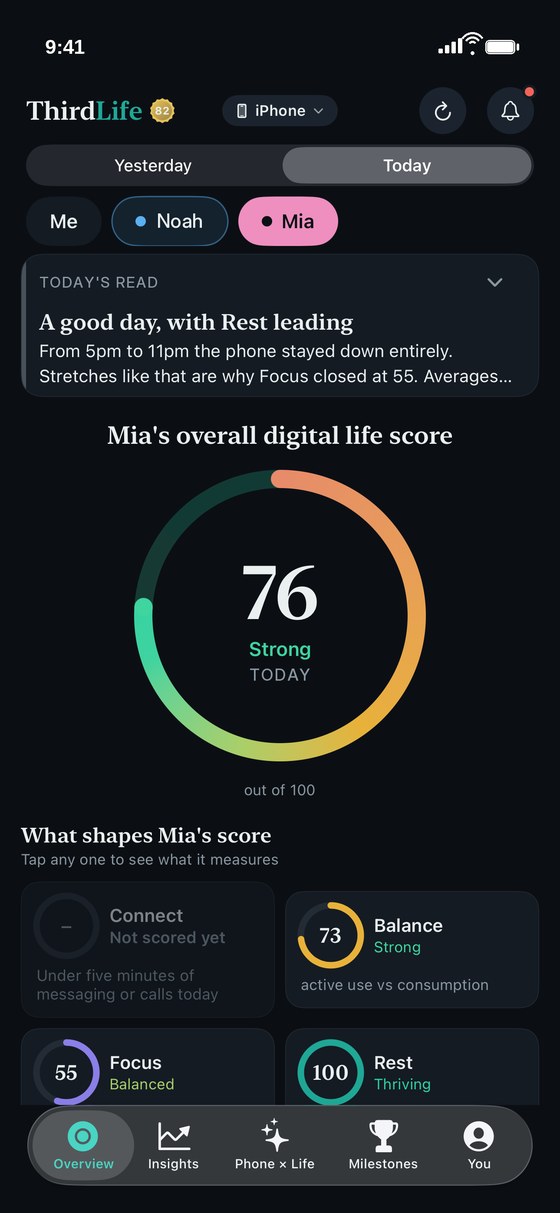
See your children's scores on your own phone: how their days balance, how much of each school day and each evening the phone was part of, and which apps took the time. Never what they wrote, never where they went. The detail is there to talk about together, not to watch. See what parents see

  • Their overall score and rings on your phone, with today's read, Insights and the monthly picture
  • What the school day and the evening actually looked like: how much of each was phone time, and which apps took it
  • Install ThirdLife on their phone too and they get their own view, and you can set limits there behind a passcode
  • They appear on their own, with nothing to switch on, once they are in your Family Sharing group with Screen Time turned on
  • Any parent or guardian in your Family Sharing group can see the children on their own phone
  • Premium is shared through Family Sharing, so one subscription covers everyone in the group
ThirdLife Overview on a parent's iPhone with Me, Noah and Mia at the top, showing Mia's overall digital life score and her four rings

We suggest telling your children what you can see. It works best as something you look at together.

How it works

Understanding, not surveillance.

Setup takes a minute. It starts with the same screen-time signals your phone already collects, and anything deeper is unlocked only with your explicit consent. Adding a child's device works the same way, with their awareness.

Private by design

Everything runs on the device. None of your screen-time data or insights ever leave the phone.

Trust, not spying

You see their scores and which apps took the time. You never see what they wrote, what they viewed inside an app, or where they went. Install ThirdLife on their phone too and they get the same view of themselves that you have.

Considered, not arbitrary

The four dimensions are drawn from the wellbeing literature, and the scoring is designed rather than guessed. We are working with researchers to test how well it holds, and we would rather say that plainly than overstate it.

Honest, not addictive

A tool designed to be needed less over time. The opposite of the apps it helps you understand.

Available now

ThirdLife is on the App Store.

Free to download, with a paid tier for the deeper features. No account needed. Your screen time, health data and scores never leave your phone.

Download on the App Store

Or leave your email for a short note each month on what's new.