Available now

Phone × Life

Your phone, next to the rest of your life.

Every screen time app can tell you how long you were on your phone. None of them can tell you what it cost. ThirdLife reads your phone beside your actual sleep, your workouts and steps, and the time you commit in your calendar, and finds what moves together. Findings nothing else can produce, because nothing else looks at both sides.

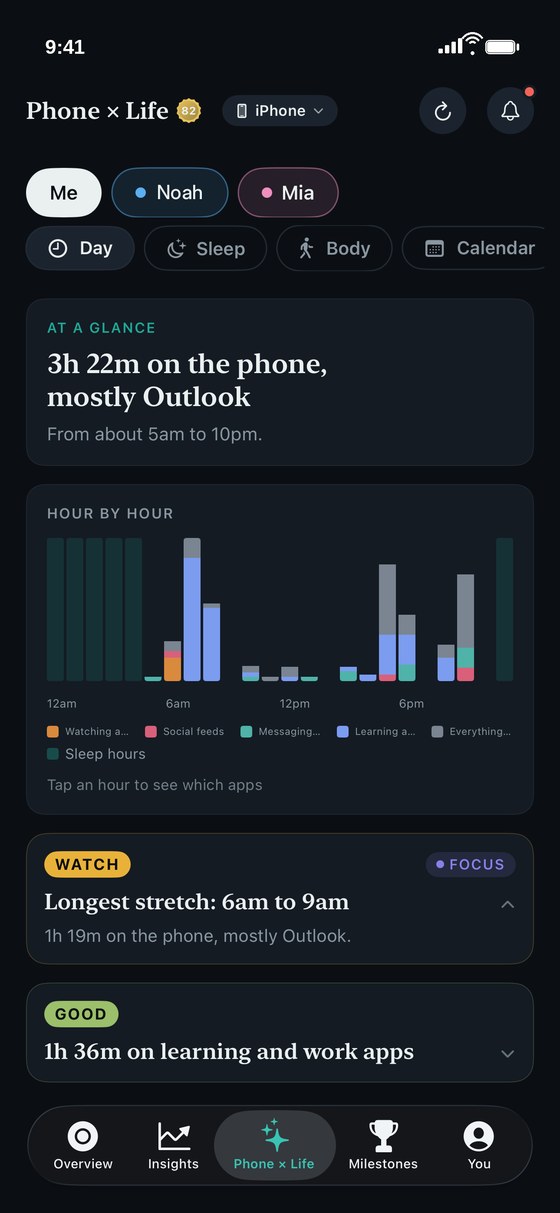
ThirdLife Phone x Life Day view, an hour by hour chart of phone use coloured by what it was used for with sleep hours shaded, and graded findings beneath

What did the day actually look like?

The Day view lays out your day hour by hour, coloured by what the phone was used for, with sleep shaded in. On a child's day, their school hours are shaded too. Tap any hour to see the apps that filled it.

It answers the question a daily total cannot. Not how much, but when. The hour before bed. The first hour after the bell. The stretch in the middle of the afternoon that nobody could account for.
On the nights your phone stayed up late, did you sleep less?

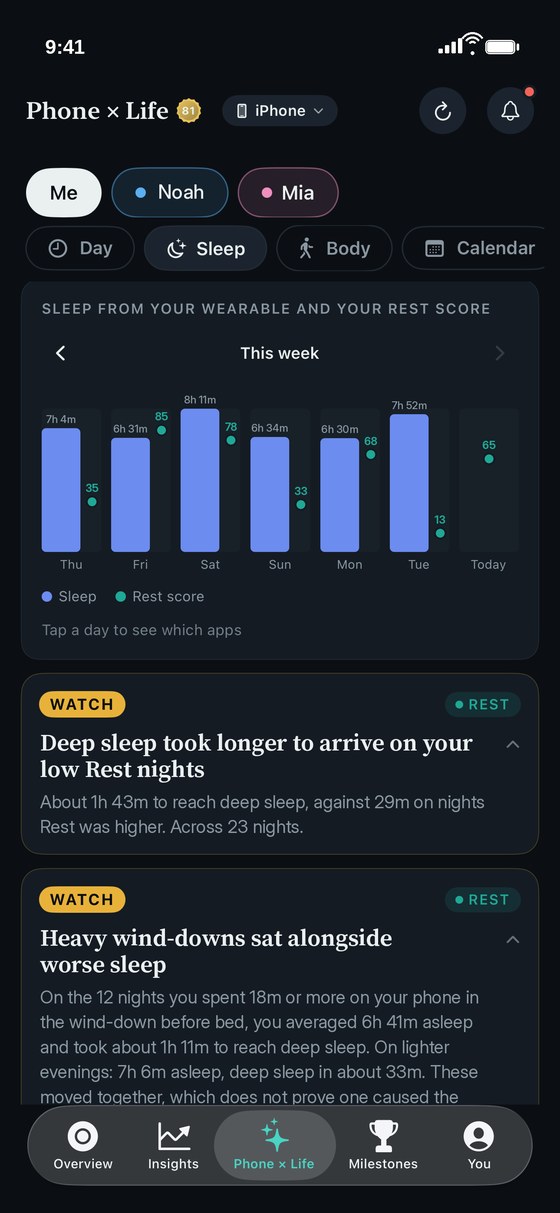
ThirdLife reads your actual sleep from Apple Health and puts it beside your phone's evenings and early hours. Not just how long you slept: whether phone use is pushing out or limiting your deep sleep and REM, whether your wakes go up on heavier phone nights, and what the late evenings cost. Both halves of the night are named honestly: the minutes in the early hours from the night just gone, and the wind-down before tonight. Real dates, real minutes.

Sleep comes from what your watch or phone records in Health. No recording, no guessing.

ThirdLife Phone x Life Sleep view, a week of sleep from a wearable beside each day's Rest score, with findings on deep sleep and heavy wind-downs
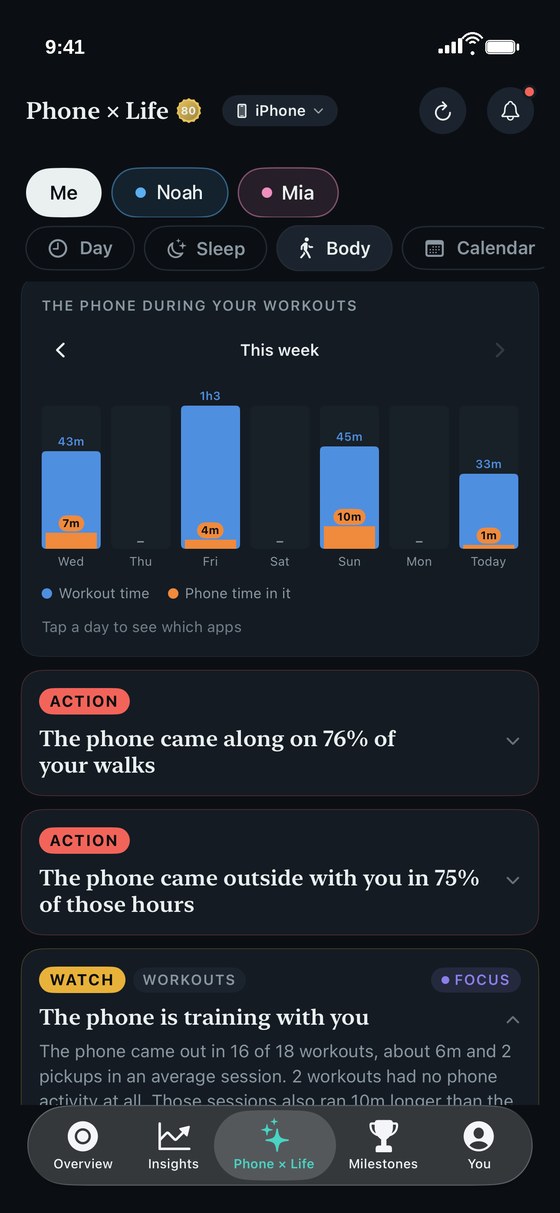
ThirdLife Phone x Life Body view, workout time each day this week with the phone time inside it in orange, and findings on walks, time outside and workouts

How much of each workout was the phone actually in?

One bar per day: your workout time, and the phone's share of it in orange, with pickups counted. Charts show a week at a time, with arrows to page back, and tapping any day opens the apps that sat behind it. Listening apps and workout trackers are left out, because music while running is not distraction. Steps and daylight sit alongside, compared against your phone time rather than a score: the days you moved more against the days you moved less, and whether the phone came along on walks and outside.

Phone time inside a workout is estimated from the hours each workout touched. Where ThirdLife estimates, it says so.

On your busiest days, does your attention hold?

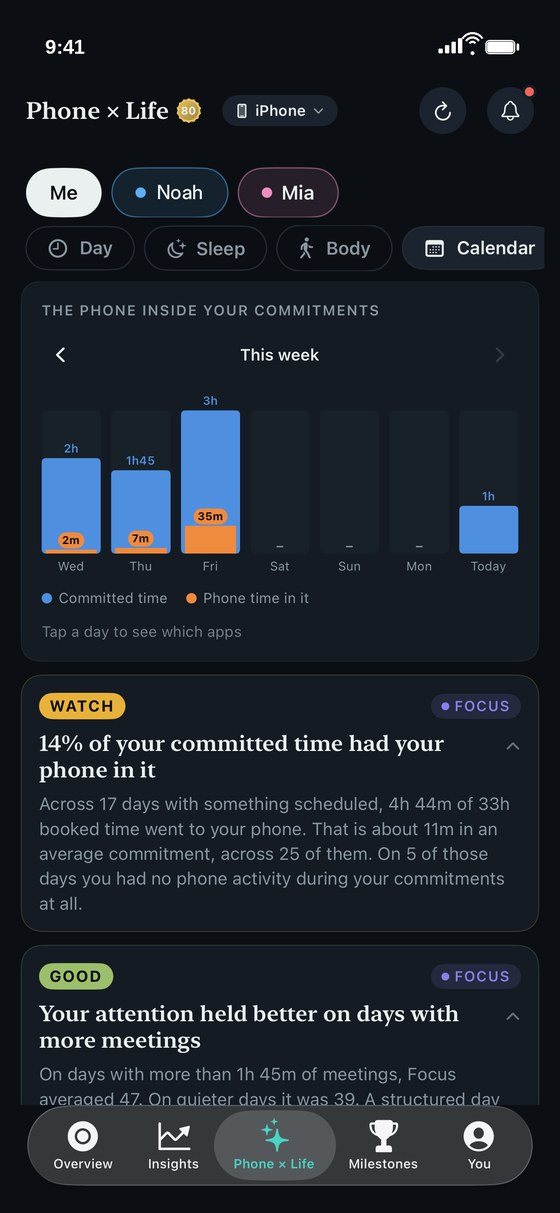
Connect your calendar and ThirdLife reads your committed time beside your phone's day. Whether meetings are where your attention quietly goes, what share of committed time the phone took, and whether a heavy day costs you the evening after it.

ThirdLife Phone x Life Calendar view, committed time each day this week with the phone time inside it in orange, and findings on committed time and meetings
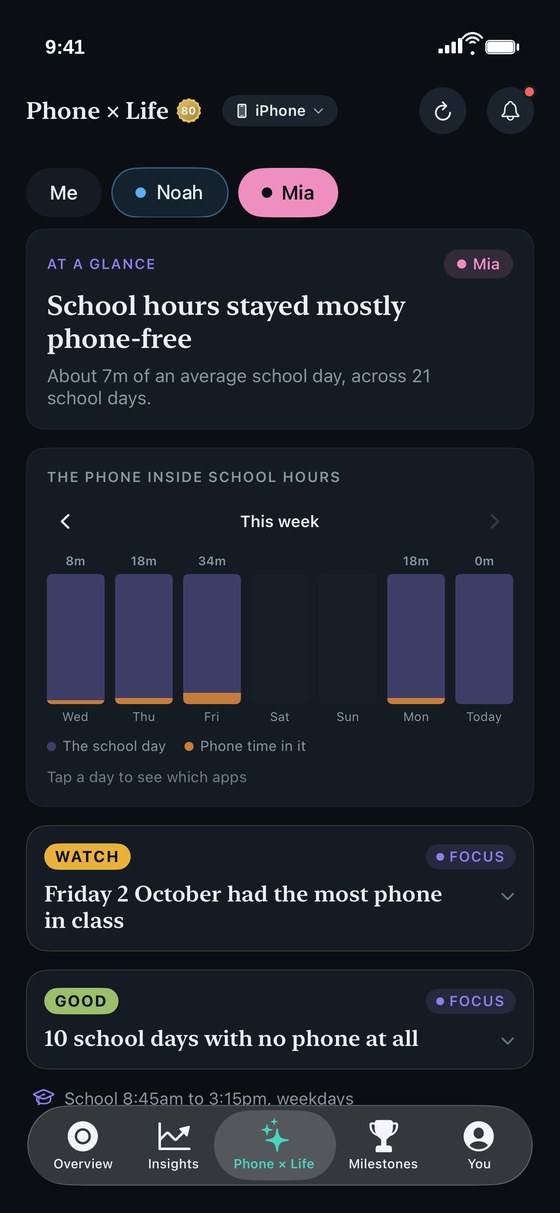
ThirdLife School view on a parent's iPhone, a weekly chart of a child's phone time inside school hours with findings on the heaviest day and phone-free school days

What does the school day look like on their phone?

On a child's phone, ThirdLife reads the school day the same way an adult's calendar is read, visible to the child on their own phone. How much of the school day the phone was actually in. Which apps take the most of it while they are at school. Whether school-time use is trending up or down across the month. And what the first hour after the bell looks like, which is often where the real story is. With ThirdLife on your own phone you can see the same school picture for your children, and which apps took the time. Never what they wrote or where they went. It gives you something real to talk about together. See ThirdLife for families

  • The phone's share of the school day, in minutes
  • The apps that take the most of it, named
  • Whether school-time use is rising or settling over the month
  • The first hour after school, where habits show themselves
How it works

Two taps, and it starts filling in.

Connect your sources

Connect Apple Health and your calendar. Two taps, and history starts filling in.

It stays here

Everything runs on this device. No accounts, no servers, no analytics on your behaviour.

Part of Premium

Phone × Life is part of ThirdLife Premium. See pricing

These are patterns that moved together, not proof that one caused the other. Where the data is thin, ThirdLife says nothing rather than guessing. You will sometimes see "nothing stood out". That is the product working.

Available now

ThirdLife is on the App Store.

Free to download, with a paid tier for the deeper features. No account needed. Your screen time, health data and scores never leave your phone.

Download on the App Store